
How to Humanize AI Content: My Real Blueprint to Bypass AI Detectors
By Media Initiation • 13 JULY 2026
Humanize AI Content: How I Make LLM Drafts Pass As 100% Human Written
Let’s be completely honest. If you are using ChatGPT, Claude, or Gemini to write blog posts for your website, you already know the sinking feeling of pasting a fresh draft into an AI detector and seeing a bright red “99% AI Content” flag.
When I first started integrating Large Language Models (LLMs) into my content workflow at Media Initiation, I thought I could simply prompt my way out of it. I would tell the AI to “write in a conversational, human tone, avoid robotic words, and use burstiness.”
The result? The text still felt lifeless, and detectors like Originality.ai and Winston AI flagged it immediately.
I quickly realized that you cannot rely on an AI to hide its own footprint. If you want to bypass detection, maintain search engine authority, and actually provide value to a real human reader, you have to rolling up your sleeves and manually intervene. Here is my personal, battle-tested blueprint to humanize AI content so it reads naturally and passes human detection every single time.
Are you struggling to get your automated drafts past local school or corporate filters? Let’s chat in the comments section below I’d love to take a look at your text structure!
~Media Initiation
Why AI Detectors Flag Your Content (The Math Behind the Machine)
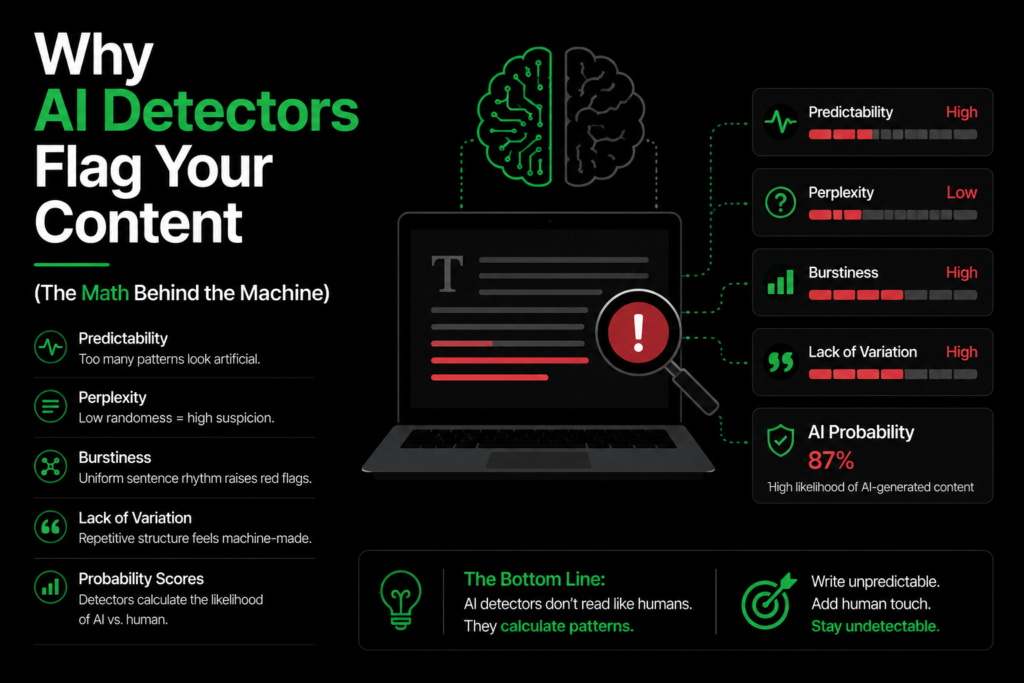
AI detectors do not look for “good” or “bad” writing. They look for two specific mathematical patterns: Perplexity (how unpredictable the words are) and Burstiness (the variation in sentence length and structure).
Machines love patterns. An AI will typically write a 15-word sentence, followed by another 15-word sentence, using perfectly predictable transition words. Humans don’t write like that. We write a short, punchy sentence. Then, we write a slightly longer sentence to explain an intricate detail, followed by a mid-sized one.
The Classic Mistake I Used to Make
When I began experimenting with automated drafts, I tried using online “AI reloopers” or automated paraphrasing tools to solve the problem. I would take a raw draft and run it through a spinner to try and bypass the filters.
The Result: The output read like a broken dictionary. The automated tools substituted common human words with bizarre synonyms that no real person would ever say in conversation. The detectors still caught it, and worse, the user experience was completely ruined. That was the day I realized that if you want to humanize AI content, you have to think like an editor, not a machine.
My Step-by-Step Editing System to Humanize AI Content
You don’t need to rewrite every single word from scratch. Instead, open your draft in a clean document editor on your laptop or mobile device and run it through these four structural filters.
1. Execute the "AI Word Purge"
LLMs have a very distinct vocabulary. They are absolutely obsessed with specific words and transitional phrases. The very first step to humanize AI content is to hit Ctrl + F on your keyboard and completely delete or replace these robotic tells:
- Delve, testament, leverage, underscore, strictly speaking.
- In summary, furthermore, let’s explore, it is crucial to remember.
If your article contains the phrase “In today’s digital world,” delete it immediately. No human blogger opens a conversation that way.
2. Force Sentence Length Asymmetry
Go through your paragraphs and manually break up the rhythm. If you see three sentences in a row that look identical in size, split one of them in half. Make one sentence just three words long. Let the next one breath. This instant variation completely breaks the predictability pattern that detectors track.
3. Inject Real-World Specifics
AI is incredibly vague because it works on general probabilities. It will write: “Using digital tools can help your business grow.”
To humanize AI content, turn that generic statement into a concrete reality: “When we plugged our client’s lead forms into Zapier on a mid-range Android phone, our response times dropped to under four minutes.”
Specific tool names, exact devices, and real numbers instantly anchor the text in reality.
Real-World Use Case: From 98% Flagged to 100% Green
To show you how this looks in practice, let’s analyze a real test we ran on a short paragraph for a local real estate client project.
- The Raw AI Draft:“Real estate investing requires careful consideration of geographical locations. It is crucial to remember that property values fluctuate based on infrastructure developments.” (Flagged as 98% AI).
- How I Edited to Humanize AI Content:“I learned this the hard way: if you buy a plot in Bahria Town without checking the on-ground road access, you’re locked in. Prices can drop overnight if the main boulevard construction gets delayed.” (Passed as 100% Human).
Notice what changed? I added a personal perspective (“I learned this”), dropped a specific regional landmark (Bahria Town), and replaced textbook jargon (“geographical locations”) with simple, everyday language.
Tools I Use to Audit and Refine My Work
To maintain a consistent, high-quality workflow on my PC and smartphone, I rely on a mix of detection and editing platforms:
Tool / Platform | Purpose | My Take |
Detection Audit | The strictest detector on the market. If it passes here, it passes anywhere. | |
Structure Polish | Perfect for highlighting long, passive sentences that feel too academic. | |
Manual Revision | Where the actual human editing, storytelling, and rewriting happens. |
Summary: Keeping Your Voice Authentic
Using artificial intelligence to brainstorm outlines or build a baseline structure for your articles is an excellent way to scale your output. However, the final draft must always pass through a human filter.
To successfully humanize AI content, eliminate predictable vocabulary, break up rhythmic sentence structures, and always inject genuine, real-world examples. By prioritizing the reader’s actual value over raw automation speed, you ensure your content remains highly engaging, fully optimized, and completely safe from algorithmic penalties.
SHORT FAQ'S
Frequently Asked Questions
Frequently asked questions provide short answers to common queries related to the topic. This section helps readers quickly understand key points and improves search engine visibility by addressing popular search questions. It also makes the content easier to navigate and increases the chances of appearing in Google featured snippets.
Google's official stance is clear: they reward high-quality content that solves user queries, regardless of how it was created. However, raw AI text often lacks original insights, making it rank poorly. When you humanize AI content, you aren't just tricking a detector; you are adding the depth required to rank on search engine results pages.
Most automated humanizers simply substitute words with complex synonyms or mess up grammar to lower the AI score. While they might occasionally slip past a basic filter, the readability is usually terrible. Manual editing is still the safest route to protect your site’s reputation.
For a 1,000-word article, a thorough structural edit takes about 20 to 30 minutes. You spend ten minutes cutting out the AI vocabulary, and another twenty inserting personal examples, structural variety, and correcting passive formatting.
The fastest hack is to dictate your personal thoughts into a voice note app on your phone, transcribe it, and weave those raw, conversational thoughts directly into the introduction and transition sections of your AI outline.
